https://www.ftc.gov/system/files/ftc_gov/images/Reported-fraud-losses-by-contact-method.jpg
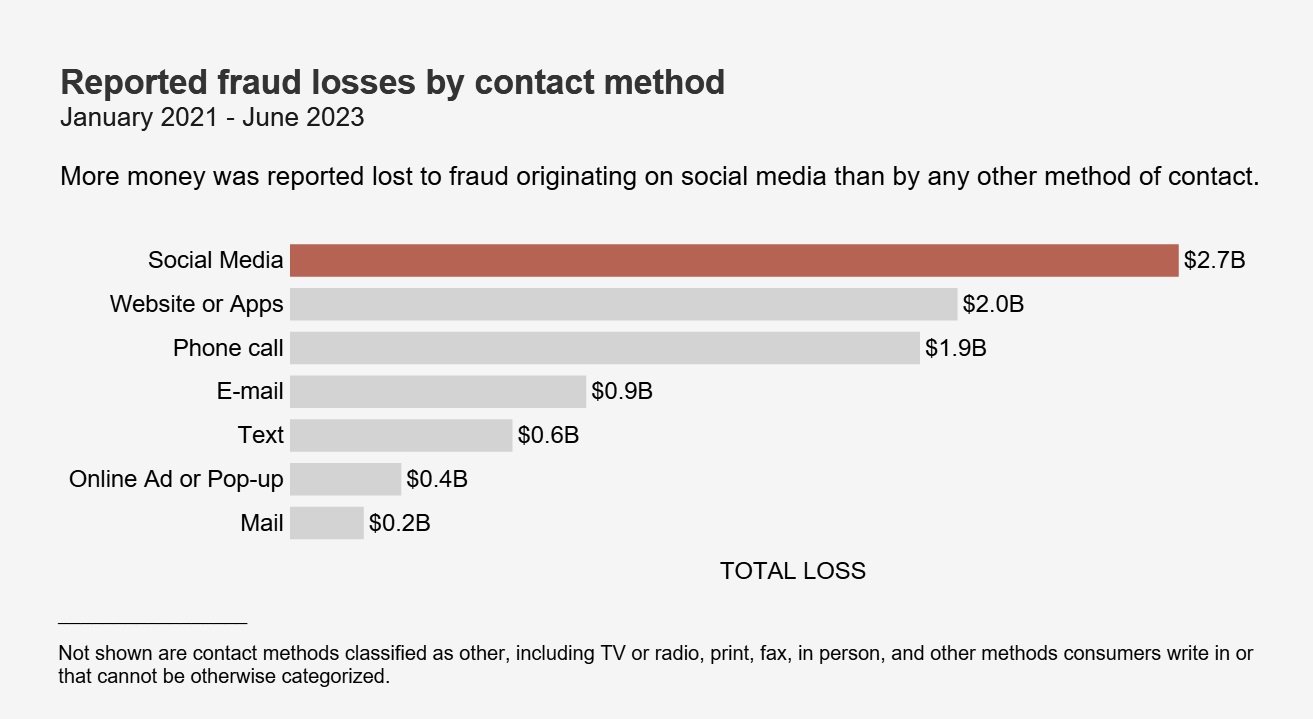
Facebook is a space for connecting with friends, sharing life updates, and engaging with content that feels familiar and nostalgic. However, it has also become a hunting ground for cybercriminals looking to exploit unsuspecting users — especially seniors — through phishing scams. According to FTC.Gov, one in four people who reported losing money to fraud since 2021 said it started on social media.
These scams can appear harmless, often disguised as fun quizzes, emotional posts, or even direct messages from “friends.” But beneath the surface, Phishing scams are designed to steal personal information that can be used to try to reset your account passwords and for identity theft or financial fraud. Before you take a quiz to find out which superhero you are — ask yourself who is gathering this information about me — and what do they plan on doing with it?
Hackers create popular quizzes to gather data like your birth date, pet’s name, or favorite color, which can then connected together like pieces of a jigsaw puzzle with public profile information to facilitate identity theft or send malware links to friends of the hacked accounts. They can even gather enough information to send you phishing attacks and scams by physical mail, or forward your mail to a new address of their choosing.
This month, we’ll explore some of the most common phishing scams on Facebook and other social platforms, how they work, and what you can do to protect yourself and your loved ones.
Phishing Scam #1 — Personality Quizzes & Nostalgic Posts That Collect Personal Data
These scams appear as fun, innocent games asking users to share personal information in the comments. Examples include:
- “What was your first car? Comment below!”
- “What’s your grandmother’s name? We’re looking for old-fashioned baby names!”
- “Your rock star name is your pet’s name and the street you grew up on! Drop it below!”
🚨 Why is this dangerous?
Hackers use these details to answer security questions on banking or social media accounts, potentially allowing them to reset passwords and take control.
How to stay safe:
❌ Never share personal details publicly.
⚠️ Assume that anything asking for names, birth years, addresses, or pet names could be a scam.
🔒 Enable two-factor authentication (2FA) on all accounts to prevent unauthorized access.
Phishing Scam #2 — Emotional “Help” Requests & Fake Fundraisers
Many scammers use emotional manipulation to trick users into giving away money or personal details. Examples include:
- “I’m looking for my long-lost cousin, John. He lived on Maple Street in the 1980s. Please help me find him!”
- “This poor child needs surgery, and we’re collecting donations. Any amount helps!”
- “My phone got stolen, and I’m locked out of my accounts! Can someone send me money?”
🚨 Why is this dangerous?
Scammers prey on kind-hearted individuals, often using fake stories to encourage donations or harvest personal details through public comments and direct messages.
How to stay safe:
❌ Never send money or share personal details without verifying the source.
⚠️ If a request seems suspicious, try reverse image searching to see if the story has been used before.
🛑 Report fraudulent fundraisers or impersonation accounts to Facebook.
Phishing Scam 3 — “Fake Account Warnings” or Suspicious Links in Messages
You might receive a message or email claiming:
- “Your Facebook account is at risk! Click this link to verify your identity.”
- “Your page has violated our policies. Appeal now to avoid being banned.”
- “A friend tagged you in a video! Click to watch.”
🚨 Why is this dangerous?
Clicking these links can install malware, steal login credentials, or lead to fraudulent websites that look identical to Facebook’s login page.
How to stay safe:
❌ Never click suspicious links in emails or Facebook messages.
🔍 Check the sender’s profile — does it look legitimate?
🔐 Always go directly to facebook.com to check account notifications rather than trusting messages.
Phishing Scam 4 — Marketplace & Giveaway Scams
If you use Nextdoor, Reddit or Facebook Marketplace, you may encounter buyers or sellers trying to scam you by:
- Overpaying with a fake check and asking you to send the difference back.
- Offering “too good to be true” deals on expensive items like cars or electronics.
- Asking for personal information like a phone number, home address, or bank details before a sale.
🚨 Why is this dangerous?
Scammers use these tricks to steal your money, identity, or financial details.
How to stay safe:
❌ Only buy/sell locally and meet in safe public places.
⚠️ Avoid sharing personal information like your home address or phone number.
🔍 Use secure payment methods rather than wire transfers or gift cards.
Final Thoughts: Stay Aware, Stay Safe
Phishing scams are becoming increasingly sophisticated and personalized, making them harder to detect. Seniors, in particular, are often targeted due to their trusting nature and willingness to engage online.
How You Can Help:
✅ Educate caregivers, family and friends — join the Senior Safety Watch community to connect and stay informed and share this information with those who may not be aware.
✅ Think before you click — avoid engaging with suspicious quizzes, messages, or fundraisers. Don’t answer the questions truthfully.
✅ Report suspicious activity — If you see something suspicious, tell a friend. Use Nextdoor, Reddit or Facebook’s reporting tools to flag phishing scams.
✅ Report Fraud — If you’ve paid a scammer, learn how to recover money and report it to the FTC at ReportFraud.FTC.gov
🔹 Join the Senior Safety Watch community to stay informed about the latest scams and security tips! Together, we can make the internet a safer place for everyone. https://seniorsafetywatch.org/
➡️ Have you or someone you know encountered a phishing scam on Facebook? Share your experience in the comments! 👇
#SeniorSafetyWatch #AISafety #ScamPrevention #StayInformed